CI/CD - huntrsoftware.com
huntrsoftware.com uses Forgejo Actions workflows to build project releases, and to build and deploy the site and project documentation to the production server. This document details how that's set up.
Overview
There are two kinds of workflow. Each project repo has a release.yaml workflow that builds and publishes its releases, and the site repo has a deploy.yaml workflow that builds the site and uploads it. Pushing a site tag to Codeberg starts the deploy. Pushing a project tag starts that project's release, which ends by starting the deploy, so the site picks up the new docs and downloads.
A private home server runs forgejo-runner in VMs to check Codeberg for available jobs. When a job is available, the runner starts a fresh Docker container that follows the job's steps. Once built, the site is deployed to the production host (DigitalOcean Droplet).
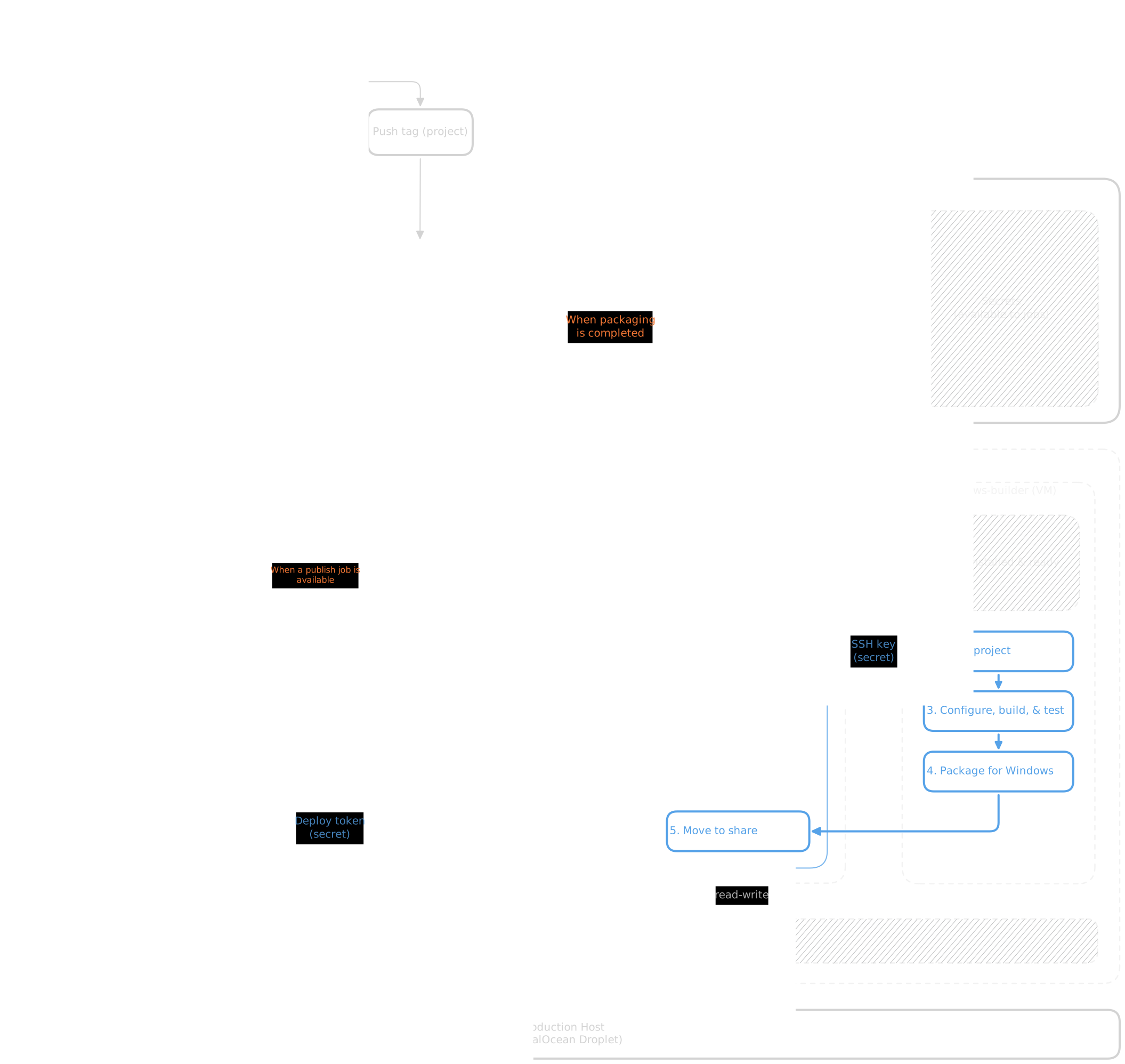
Layers has no downloads, so its
release.yamlworkflow is one job: build and test, then the above Publish steps.
Home server
The home server runs three VMs, each with one role:
| VM | System | Role | Release share |
|---|---|---|---|
site-ci-cd |
Ubuntu Server 24.04, 4 vCPU, 4 GB RAM | Deploys the site. Only the site repo can use it. | Read-only |
linux-builder |
Ubuntu Server 24.04, 8 vCPU, 12 GB RAM | Builds releases for every project. | Read and write |
windows-builder |
Windows 11 Pro, 6 vCPU, 8 GB RAM | Builds Windows releases for jobs on linux-builder. |
None |
The release share is a folder on the home server that holds the download files for every release (installers, AppImages, and zips). Release jobs copy their files into it, and the deploy publishes them.
The two Ubuntu VMs run Docker and forgejo-runner (pinned to 13.2.0, signature checked) as a systemd service under its own runner user. The runner account can control Docker, which effectively makes it root on whatever machine it runs on. The VMs isolate that control from the rest of the home server.
The runners poll Codeberg for jobs, so nothing on the home network is exposed to the Internet. The polling interval is set to 30 seconds to use less of Codeberg's donated infrastructure.
Deploys get their own VM, so the production deploy key never sits on a machine that builds code. The site-ci-cd runner also takes one job at a time, so two deploys never overlap.
forgejo-runner has no official Windows build, so windows-builder doesn't run one. Instead, a job on linux-builder connects to it over SSH and runs each build step there. The SSH key for this only works from linux-builder's address, and the job refuses any host other than windows-builder.
Project releases
Layers, Vortex, and Docuriser each have a release workflow under .forgejo/workflows/release.yaml (Layers, Vortex, Docuriser). It's triggered when an X.Y.Z tag gets pushed or via a manual dispatch that names the tag, which reruns that release. It runs on linux-builder in the official ubuntu:24.04 image (pinned by digest), and:
- Builds and tests the tagged version. Vortex and Docuriser package their Linux and Windows downloads (for Vortex, its demo app) at the same time and copies them into the release share. Each file is copied under a temporary name and renamed once complete, so a deploy never publishes a half-copied file. Layers is a library, so it has no downloads.
- Creates the Codeberg release, with the version's section of
CHANGELOG.mdas its notes. A rerun leaves an existing release as it is. - Starts the site deploy at the newest site tag rather than
main, so unreleased site changes stay unpublished. It does this through Codeberg's API, with an access token that is stored as a secret on Codeberg.
The deploy workflow
The deploy workflow is in the site repo under .forgejo/workflows/deploy.yaml. It's triggered when X.Y.Z site tags get pushed, when a project release starts it, or via a manual dispatch. The manual method deploys whichever branch is picked (latest tag preferred). The container is the official ubuntu:24.04 image (pinned by digest).
The workflow follows the instructions of the build guide to clone the projects to a layout matching the site's Docuriser configuration. Docuriser itself is pinned to the desired release tag, and only the docuriser-cli is built.
The release share is mounted read-only and linked in as the site's downloads/ folder. The site only ships the files that it links to, so old release files can stay in the share.
Every included tagged version for every project is rebuilt each time the workflow runs. Untagged projects are built as 0.0 previews; when they are tagged, their tags won't build until 0.0 --working-tree is removed from the project's line.
Deploying to production
On the production host, an SSH-only deploy user owns the webroot. The key is locked down in authorized_keys with command="rrsync -wo <webroot>",restrict, so the key gets no shell, can only write (upload and delete), and only into the webroot folder.
The deploy key (private SSH key for deploy user) and the production host key are stored as secrets for the site repo on Codeberg. With StrictHostKeyChecking=yes set, the job refuses any other host.
Limitations
- Android builds are packaged by hand, and there are no macOS builds yet.
- Every run is a full rebuild with no caching, so each project release rebuilds the whole site.